Live tank and GPS data feed the theft checks and fuel plans; fuel-card files feed transactions and negotiated pricing; pricing networks feed daily station prices; your TMS feeds dispatch routes — or push routes from any TMS with the API.
Live tank and GPS data feed the theft checks and fuel plans; fuel-card files feed transactions and negotiated pricing; pricing networks feed daily station prices; your TMS feeds dispatch routes.
Telematics / ELD
Live tank level and GPS position, plus MPG, idle, cruise control and the rest of the driver metrics.
Where the truck was and what its tank did on every fill-up is what the theft checks verify a transaction against, and what the optimizer sizes a fuel plan from.
Every purchase lands on the right vehicle and is reconciled against the gallons it burned; the discounts are what the optimizer plans on, not the pump price.
Dispatch routes, so loads become routes on their own.
Alvys and DataTruck loads are polled every five minutes, Samsara and Motive routes arrive through their telematics connections, and any other TMS pushes routes through the API. When the truck reaches the first stop, the fuel plan is built and sent to the driver.
Sources: Alvys · DataTruck · Samsara and Motive routes · any TMS via the API
Driver messaging
Where fuel plans, price alerts and coaching notes land.
The ELD tablet message, Telegram on the driver’s phone, or SMS: whichever channel the driver already uses. One switch in Settings covers every message the account sends to a driver.
A dispatch route goes in; a fuel plan comes back, with the same stops, gallons, negotiated prices and ETAs your dispatchers see in the Fuel Optimizer. If your TMS is not on the wall above, this is how it connects.
1
Step 1: Create a key under Settings › API Keys
Live keys start with nvl_live_, sandbox keys with nvl_test_. Give it only the scopes it needs: routes:write, routes:read, vehicles:read, drivers:read.
2
Step 2: POST the load to /v1/routes
An external id, the vehicle’s unit number or VIN, the driver’s name and the stops with their times. Push the same external id again and the route is updated; active routes are never changed.
3
Step 3: GET /v1/routes/{id} and read back the fuel plan
Status moves pending → draft → planned → active → completed. Once the plan exists you get its stops, gallons, prices and ETAs: the same plan the driver is sent.
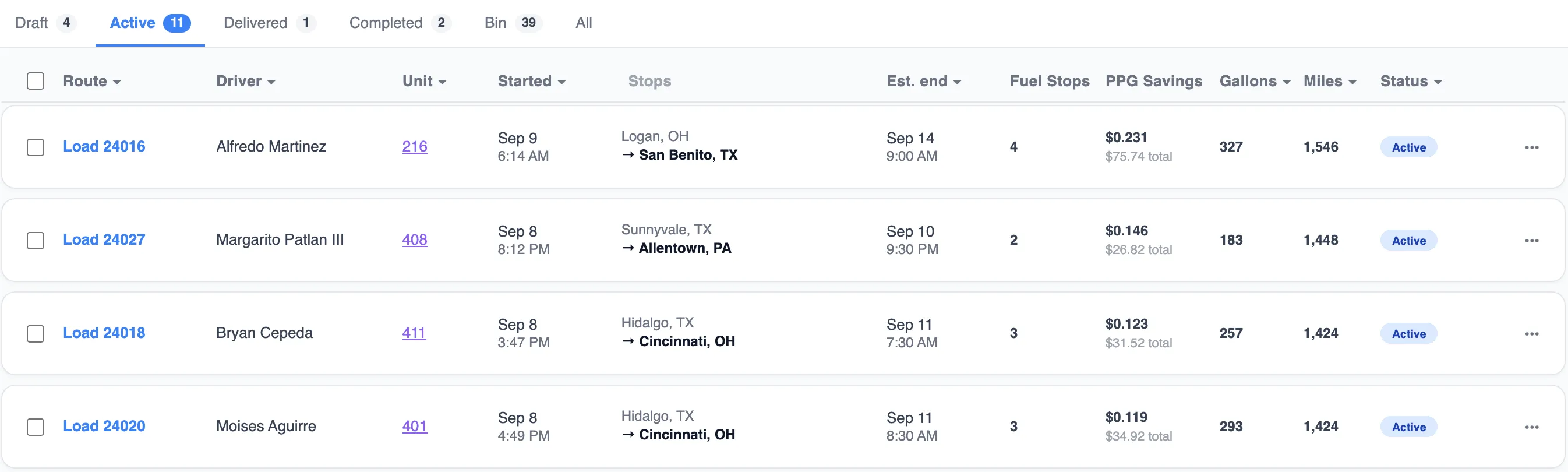
The request above, as it lands: Load 24016 for Alfredo Martinez on unit 216, Logan, OH → San Benito, TX, planned with four fuel stops and $0.231 per gallon saved. A route pushed through the API becomes a route like any other.
Resources
Method
Path
What it does
GET
/v1/me
Who am I: the key, its scopes and tenant
POST
/v1/routes
Push a dispatch route: external id, vehicle unit or VIN, driver name, stops with times
GET
/v1/routes/{id}
Status (pending → draft → planned → active → completed) and the fuel plan with stops, gallons, prices, ETAs
GET
/v1/routes
List routes
DELETE
/v1/routes/{id}
Withdraw a route that has not gone active
GET
/v1/vehicles
Vehicles, for matching unit numbers and VINs
GET
/v1/drivers
Drivers, for matching names
Keys are created under Settings › API Keys and carry the scopes routes:write, routes:read, vehicles:read, drivers:read. Base URL https://app.novilfleet.com/v1.
Developer docs
The docs are the contract
Quickstart, authentication, errors, rate limits, versioning, guides and the full reference live at app.novilfleet.com/docs. Start with these three.