Driver Performance & Efficiency Insights
Improve fuel efficiency

Fueling Performance tracks trends in MPG, idle time, cruise control and more, so you can see what's happening, why it's happening, and how to fix it, turning visibility into measurable improvement.

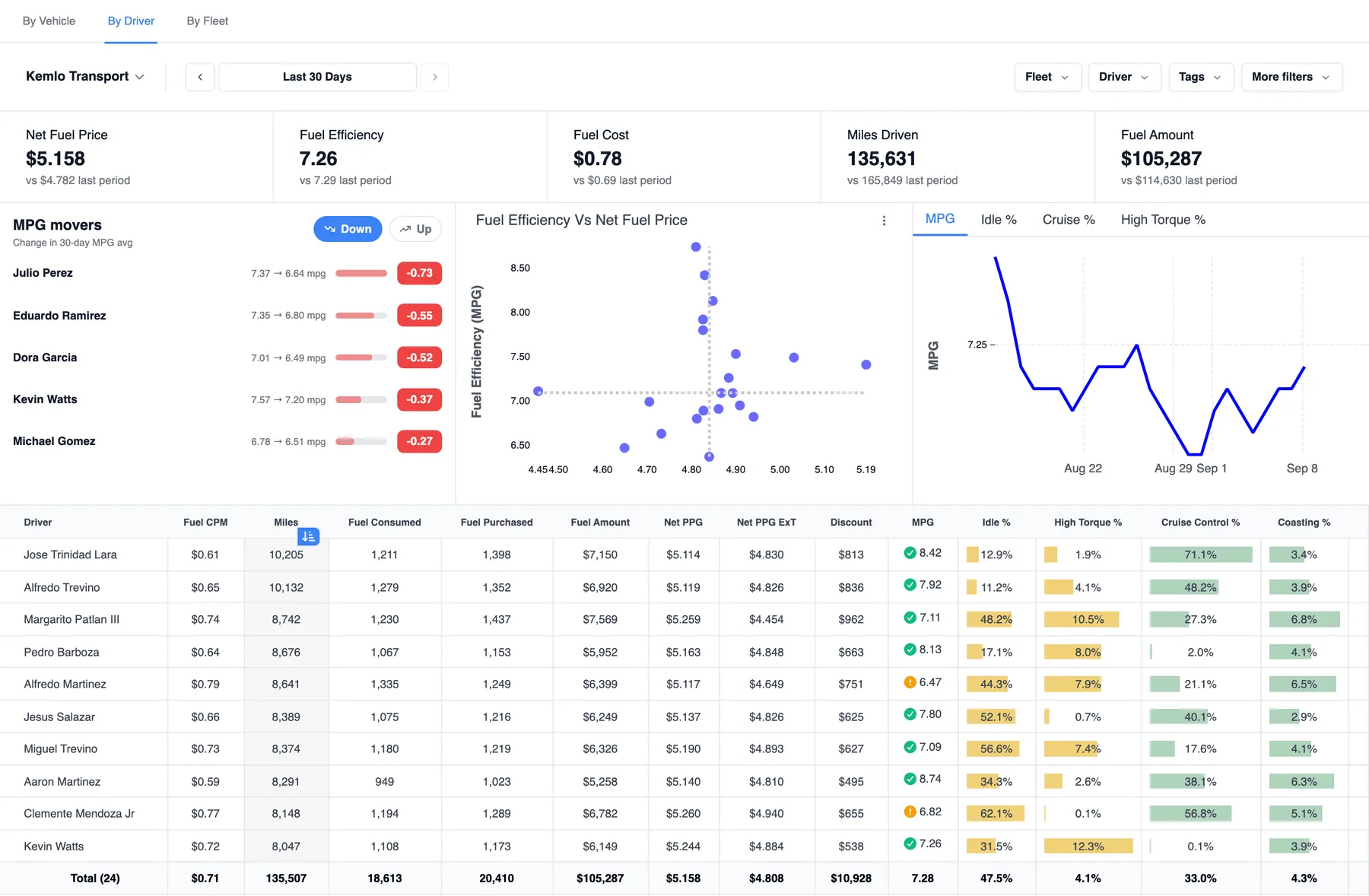
Fueling Performance dashboard by driver showing net fuel price, fuel efficiency and fuel cost KPIs, an MPG movers panel with the five drivers whose 30-day MPG dropped most, fuel efficiency versus net fuel price, an MPG trend and a per-driver performance table

Where the miles go

A Few Points of Efficiency Add Up to Millions

Idle time, coasting and high torque quietly eat into fuel efficiency, and without visibility, fleets miss it every day. Driver efficiency alone can make up to a 1.0 MPG difference between equal equipment.

The Control Center breaks efficiency down by driver, vehicle or terminal and compares across terminals, regions or divisions, so a slipping MPG has a name, not just a fleet average.

1.0 MPG

the driver-efficiency gap between equal equipment: same trucks, different habits

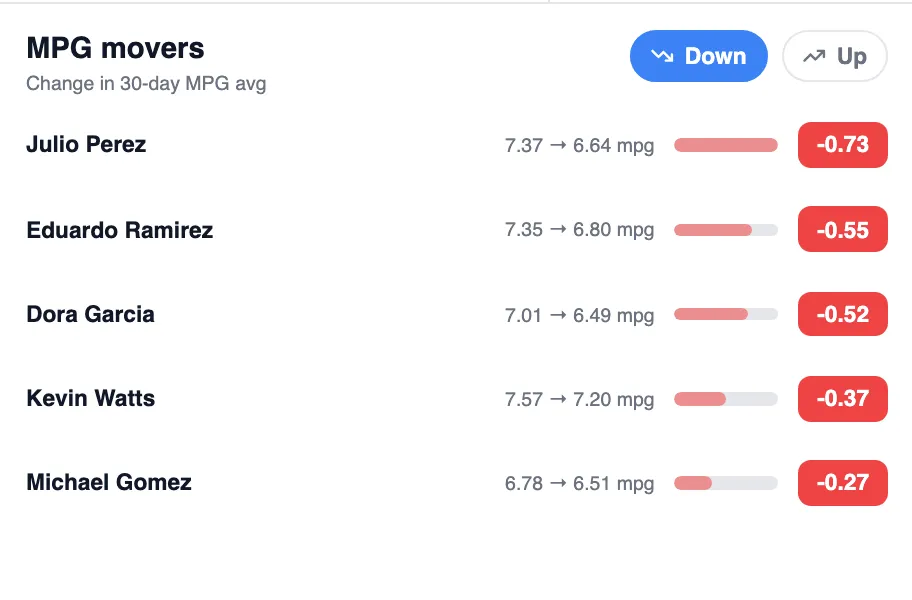
MPG movers panel listing five drivers whose 30-day MPG dropped, from -0.73 to -0.27
MPG movers: the five drivers whose 30-day MPG average dropped the most, straight off the driver dashboard.

Driver Performance Insights

What's Inside Driver Performance Insights

  • Real-time trend analysis on MPG, idle, cruise and more
  • Positive and negative leading indicators
  • AI driver coaching with actionable feedback
  • Driver engagement campaigns and leaderboards

Fueling Performance turns driver data into better driving by monitoring trends in MPG, idle time, cruise control, and more, then connecting them to outcomes to deliver personalized coaching and rewards directly to each driver.

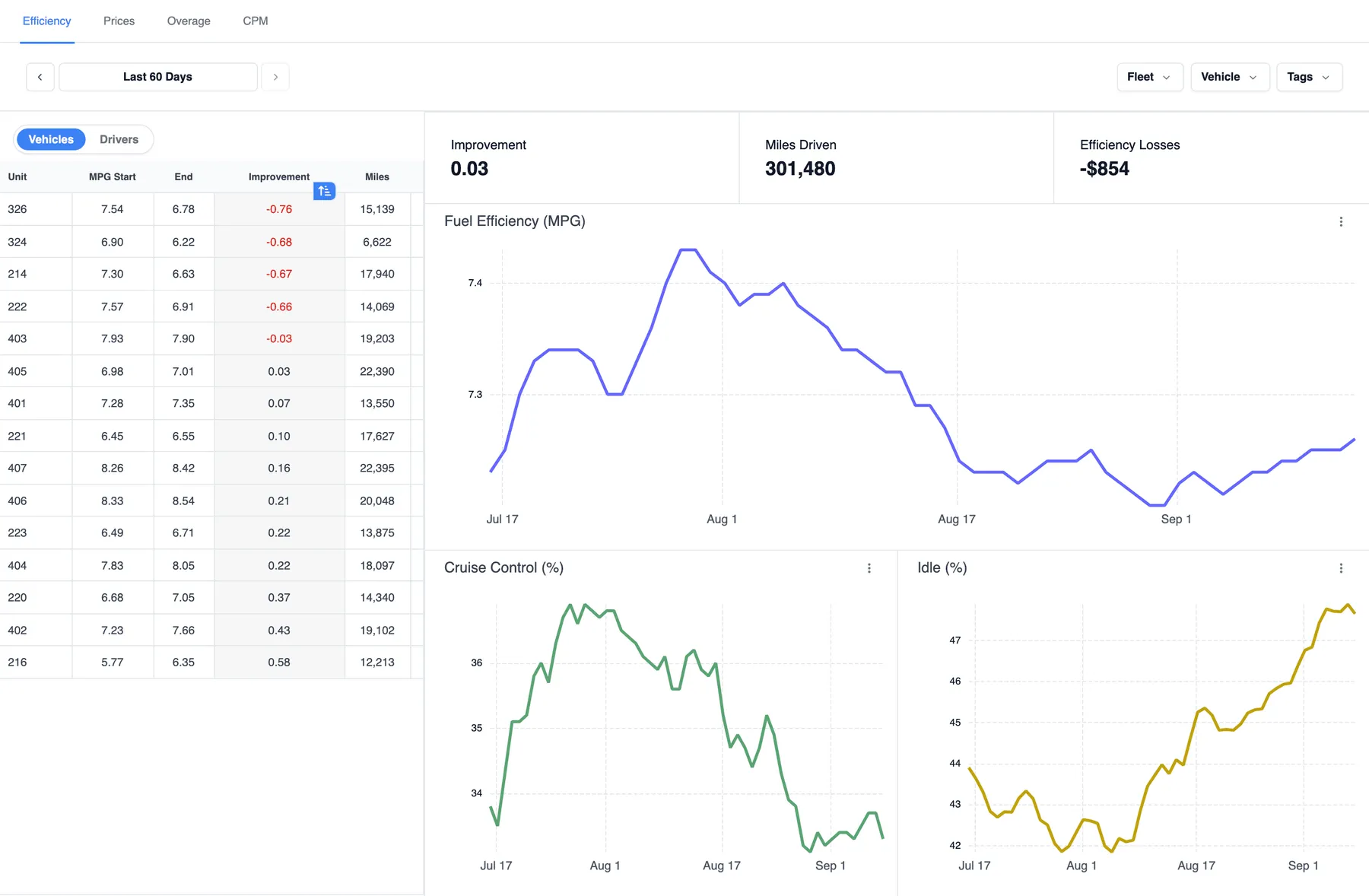
Efficiency trends over the last 60 days: a per-vehicle table of MPG start, end, improvement and miles beside fleet MPG, cruise control and idle trend charts
Sixty days of MPG by unit next to the fleet's MPG, cruise control and idle lines: the trend, and who is moving it.

Campaigns and leaderboards

Scorecards on a cadence

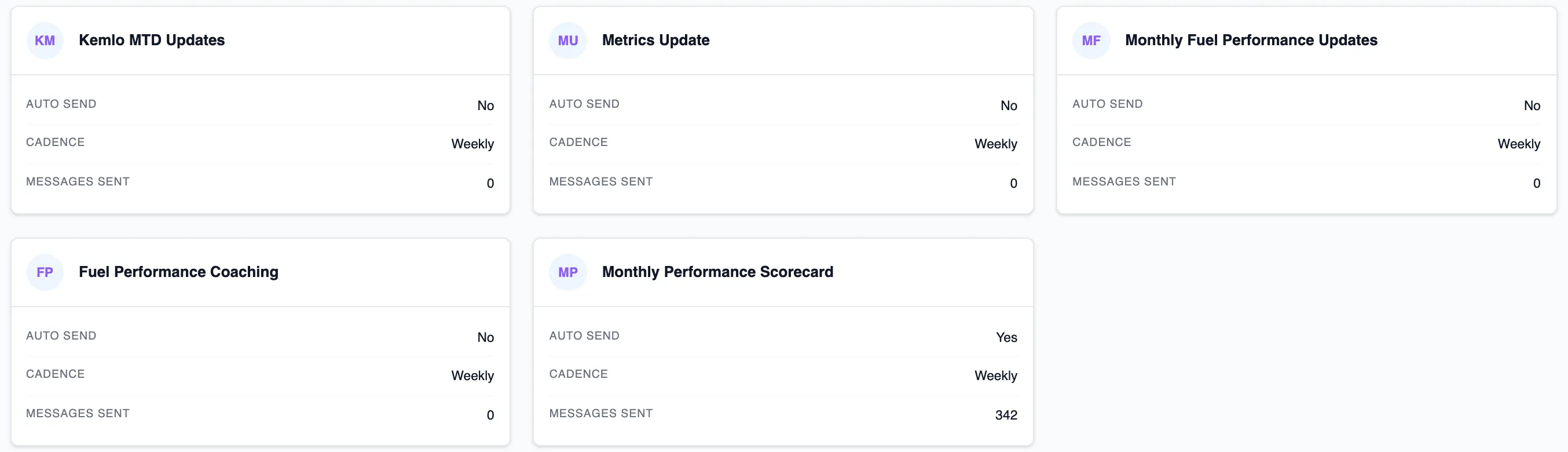
Engagement campaigns go out weekly: metric updates, monthly fuel-performance updates and a performance scorecard, auto-sent or held for your review first.

Five coaching campaign cards showing auto-send, cadence and messages sent, including a weekly Monthly Performance Scorecard with 342 messages sent

AI driver coaching

Getting better, and here's why

A recognition note drafted from one driver's own fourteen days, with the numbers that earned it. You read it, then send it.

32.8%idle, down from 46.6%
6.77MPG, up from 6.14
4,412miles in 14 days

“Alfredo - what did you change these last two weeks? Your idle time dropped from 46.6% of your hours to 32.8%, and your MPG went from 6.14 to 6.77 over 4,412 miles.”

Driver Coach · 78% sure · waiting on you
Read
  • Driver behavior
  • Efficiency drivers
  • Route terrain
  • Coaching history

Stay ahead of declining performance

AI Coaching, Delivered Directly to Drivers

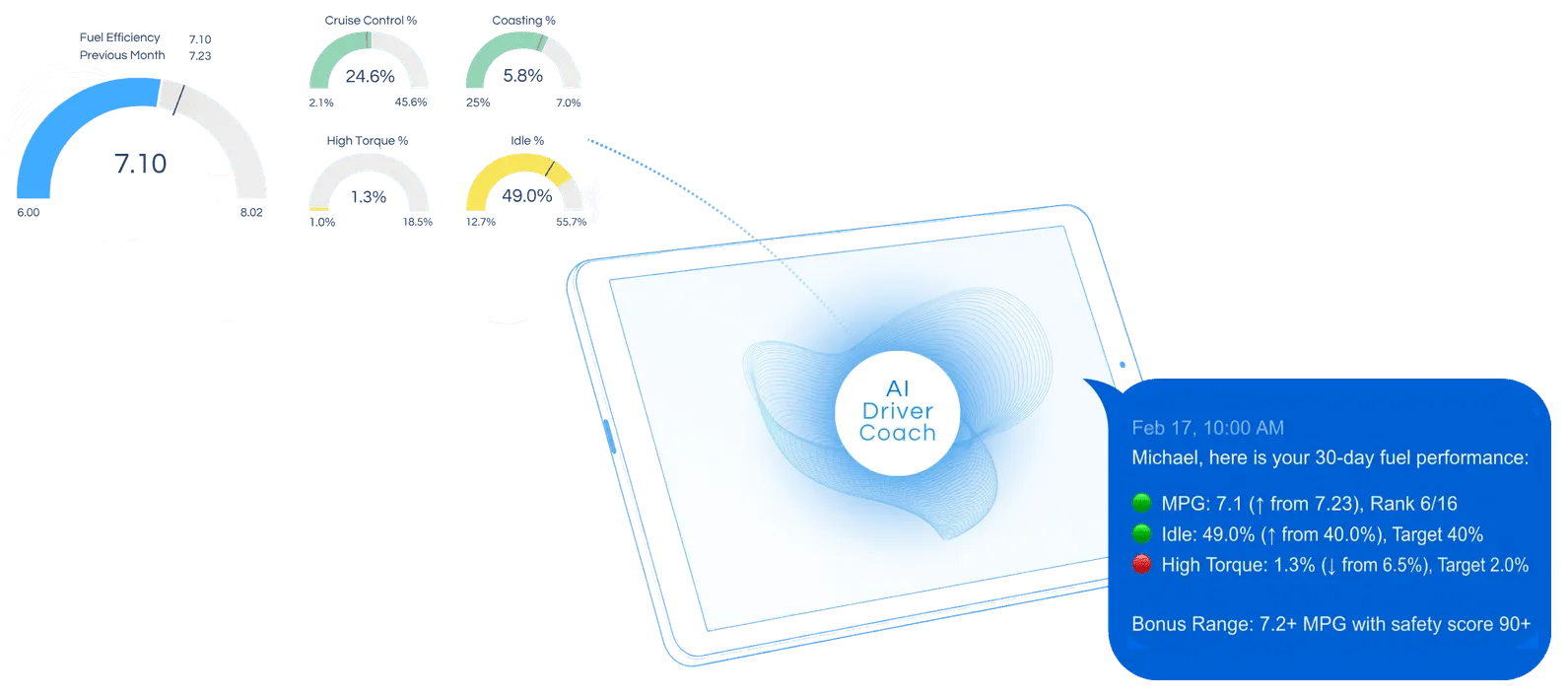
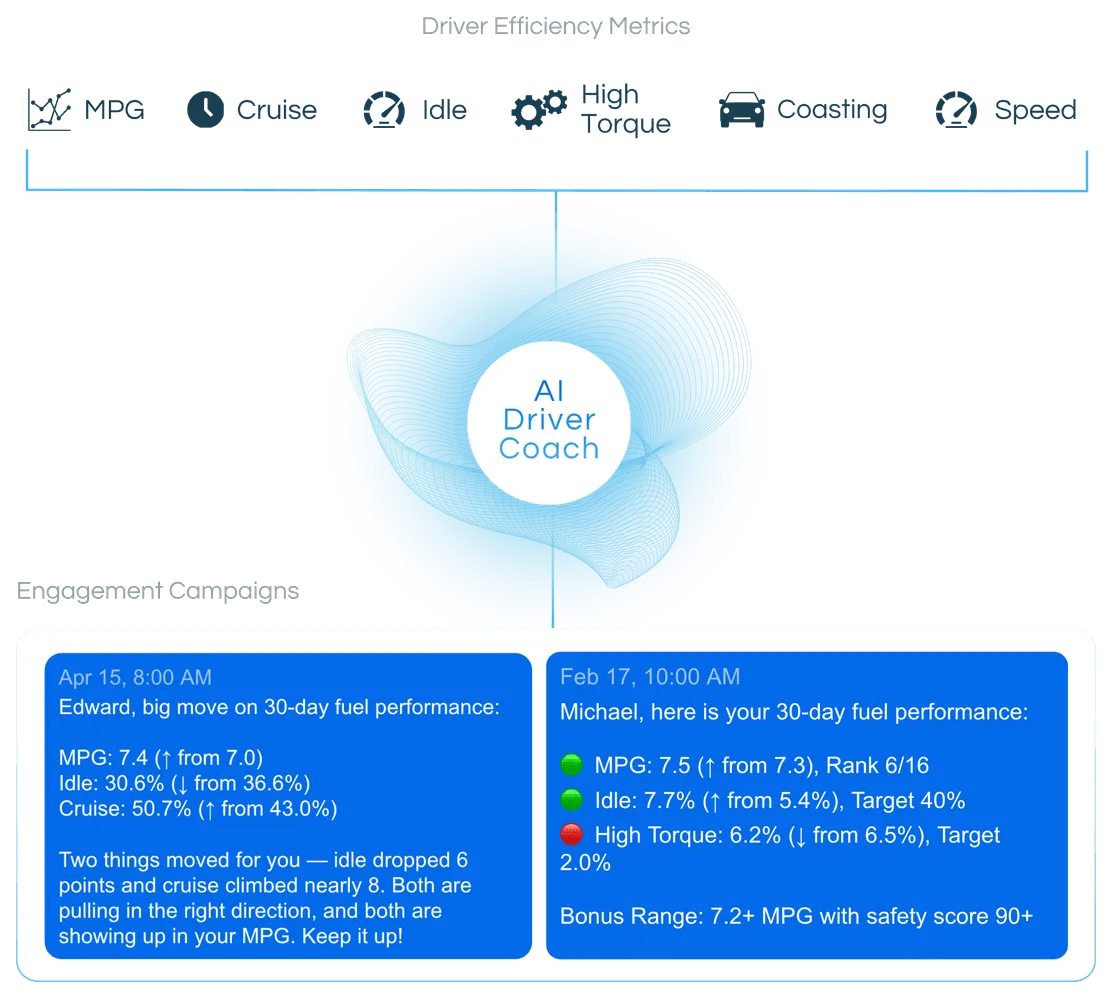
Driver efficiency moves every day. Fueling Performance tracks MPG, idle, cruise control, high torque, coasting and speed, then turns the data into interpretable, actionable feedback drivers actually use, delivered through the ELD app or SMS.

AI Driver Coach turning efficiency gauges for fuel efficiency, cruise control, coasting, high torque and idle into a 30-day performance message on a driver's tabletDiagram of the AI Driver Coach turning MPG, cruise, idle, high torque, coasting and speed metrics into personalised coaching messages
  • Accountability

    Knowing performance is visible, with ownership over outcomes and awareness of metrics.

  • Competition

    Peer rankings, fleet leaderboards and contests to spark engagement.

  • Rewards

    Fuel performance rewards, redeemable prizes, pride and recognition.

AI Agents · Driver Coach

Hire a Driver Coach that drafts the right note

Coaches drivers on how they drive, buy and follow their plans — one specific, askable note at a time, drafted for you to send.

Every suggestion shows a confidence %, the evidence it read, a “Before you act” list of caveats and the exact note the driver would read. Sending it is one typed product command, one click, never a raw edit.

Scope a hire to the whole fleet, a fleet, a tag or a single driver, and hire more than one with different settings. Every hire starts in Shadow, so you see how often you would have agreed before it says a word to anyone.

What it watches

  • Fuelling off the network
  • Splash and dash
  • Getting better, and here's why
  • Slipping, and here's why
  • Idle crept up
  • Following the plan
  • A new driver's first month
  1. Off
  2. Shadow
  3. Suggest
  4. Approve
  5. Auto

Every hire starts in Shadow. Nothing without an undo goes past Approve, and a product update never moves a task up the ladder.

Following the plan

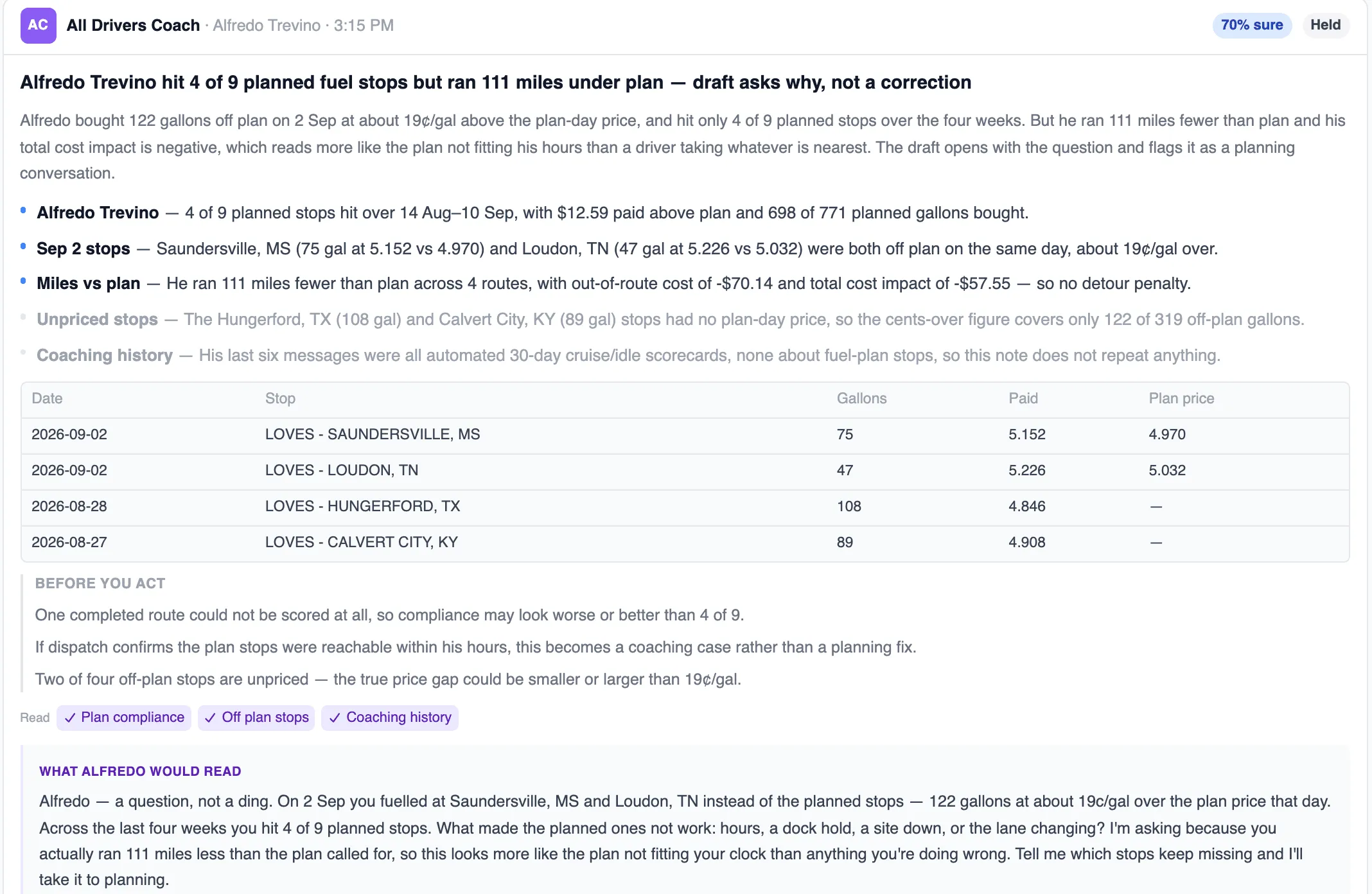
When a driver misses planned fuel stops, the Driver Coach turns the miss into a question for the driver, not a reprimand, with the route’s compliance numbers attached as evidence.

Driver Coach card: Alfredo Trevino hit 4 of 9 planned fuel stops but ran 111 miles under plan, with evidence, an off-plan stop table, caveats and the draft note he would read
The real card: the evidence it read, the off-plan stops, the caveats and, at the bottom, exactly what Alfredo would read. It stays held until you send it.
Driver Coach70% sureHeld

Alfredo Trevino hit 4 of 9 planned fuel stops but ran 111 miles under plan — draft asks why, not a correction

  • Alfredo Trevino — 4 of 9 planned stops hit over 14 Aug–10 Sep, with $12.59 paid above plan and 698 of 771 planned gallons bought.
  • Sep 2 stops — Saundersville, MS (75 gal at 5.152 vs 4.970) and Loudon, TN (47 gal at 5.226 vs 5.032) were both off plan on the same day, about 19¢/gal over.
  • Miles vs plan — He ran 111 miles fewer than plan across 4 routes, with out-of-route cost of -$70.14 and total cost impact of -$57.55 — so no detour penalty.
Before you act
  • One completed route could not be scored at all, so compliance may look worse or better than 4 of 9.
  • If dispatch confirms the plan stops were reachable within his hours, this becomes a coaching case rather than a planning fix.
  • Two of four off-plan stops are unpriced — the true price gap could be smaller or larger than 19¢/gal.
What the driver would read

Alfredo — a question, not a ding. On 2 Sep you fuelled at Saundersville, MS and Loudon, TN instead of the planned stops — 122 gallons at about 19c/gal over the plan price that day. Across the last four weeks you hit 4 of 9 planned stops. What made the planned ones not work: hours, a dock hold, a site down, or the lane changing? I'm asking because you actually ran 111 miles less than the plan called for, so this looks more like the plan not fitting your clock than anything you're doing wrong. Tell me which stops keep missing and I'll take it to planning.

Plan complianceOff plan stopsCoaching history

Telegram · SMS · ELD

On the channel drivers already use

Coaching notes, scorecards and fuel plans go out on whatever the driver already has open: the ELD tablet message, Telegram on their phone, or SMS. Nothing new to learn in the cab.

  • ELD in-cab message

    Fuel plans and coaching land as a message on the ELD tablet the driver already reads, through the telematics integration you run.

  • Telegram

    Every note, scorecard and fuel plan can reach the driver’s own phone as a Telegram message.

  • SMS

    A plain text message, for fleets and drivers who want the simplest channel there is.

One switch over every message

Driver messaging has a single fleet-wide switch: turn it off and no message of any kind reaches a driver, fuel plans and campaign coaching alike, while everything else keeps running. Every send is still logged.

Settings › Driver Messaging: one switch over every message this account sends to a driver, fuel plans and campaign coaching alike

The driver's own fuel-plan page

A fuel plan drivers can pull up themselves

Drivers get their own phone page. A text or e-mail link signs them in, the vehicle is pre-selected, Fetch from truck pulls current fuel, MPG and location, and one tap optimizes.

Prices are hidden or shown per your fleet's setting, so a driver sees the stops and the gallons, and the negotiated price only if you want them to.

  1. Step 1: Open the link from the text

    A text or e-mail link signs the driver in. No password, and the vehicle is already selected.

  2. Step 2: Fetch from truck

    Current fuel, MPG and location arrive from the truck’s telematics.

  3. Step 3: Optimize

    One tap builds the fuel plan: which stations and how many gallons, with the price hidden or shown per your fleet’s setting.

Next step

Turn Insights Into Action, Today

Walk through your fleet data and identify where cost, loss, and efficiency can improve. Use our Calendly scheduler to pick a time that works for you.