AI Agents

AI agents that work your fuel data around the clock

Hire a Fuel Analyst, a Driver Coach or Feed Watch, scope it to a fleet, a tag or a single driver, and let it watch every transaction. Every suggestion arrives with a confidence score, the evidence it read and a “Before you act” list — nothing acts on its own until you move it up the autonomy ladder.

Agents feed showing a Driver Coach suggestion at 78% confidence: Alfredo Martinez cut idle from 46.6% to 32.8% and gained 0.63 MPG over 4,412 miles, with its evidence, a metrics table, Before you act caveats and Draft note, Send now and Dismiss actions

The hire model

Agents are hires, not settings

You hire a role, scope it (whole fleet, a fleet, a tag, a driver…), and can hire more than one of a role with different settings. Every hire starts in Shadow.

  1. Step 1: Hire a role

    A Fuel Analyst, a Driver Coach or Feed Watch, each with its own task library, evidence and allow-listed actions. An Onboarding role handles data readiness.

  2. Step 2: Scope it

    Whole fleet, a fleet, a tag, a driver… and hire more than one of a role with different settings, say one coach per fleet.

  3. Step 3: Start in Shadow

    Every hire starts in Shadow: it runs and decides, tells no one, and you see how often you would have agreed before it proposes anything.

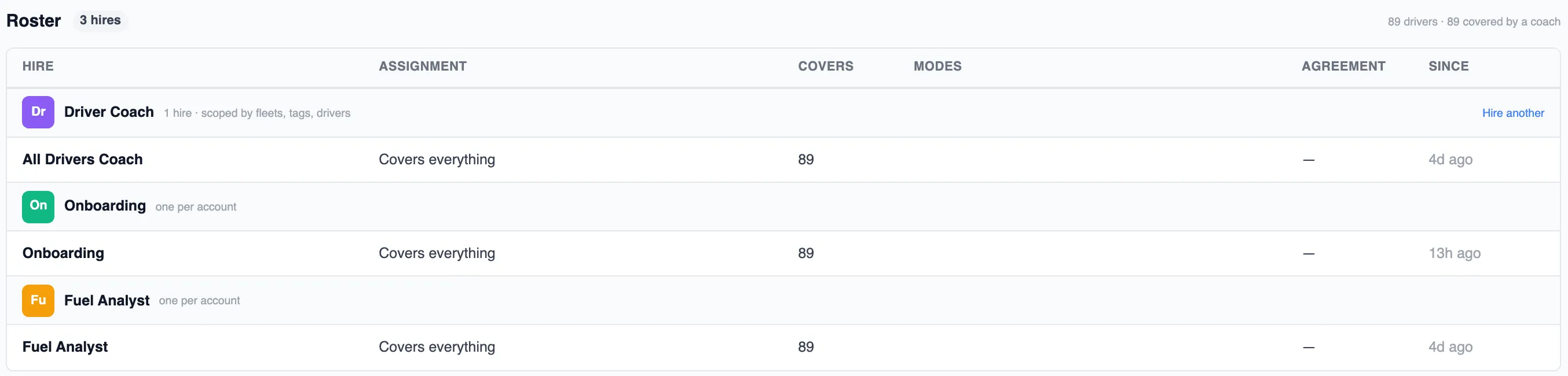
Agent roster with three hires: a Driver Coach scoped by fleets, tags and drivers, an Onboarding hire and a Fuel Analyst, each covering 89 drivers, with columns for assignment, coverage, modes, agreement and hire date
The roster: three hires covering 89 drivers. Hire another Driver Coach and scope it to a fleet, a tag or a list of drivers.

Three roles today

A Fuel Analyst, a Driver Coach and Feed Watch

Each role is a job description with its own task library, the evidence it is allowed to read and the actions it is allowed to propose.

Keeps every transaction honest

Fuel Analyst

Keeps your fuel record straight: finds dead gauges and quiet trucks, puts transactions on the right vehicle, fixes the mappings behind repeat mistakes, reconciles gallons bought against gallons burned, and tells the fuel buyer where the network has holes.

12 tasks in the library

Drafts the right note

Driver Coach

Coaches drivers on how they drive, buy and follow their plans — one specific, askable note at a time, drafted for you to send.

7 tasks in the library

Tells you when a feed goes quiet

Feed Watch

Tells you when a feed stops delivering, before the reports quietly go stale.

1 task in the library

An Onboarding role handles data readiness, one per account, so the other hires only run on data that is ready.

The task library

20 ready-made tasks, grouped by role

Each task listens for a signal, reads evidence, decides with a prompt you can edit, and may propose only allow-listed actions.

  1. SignalEach task listens for a signal, a change in the data it is scoped to.
  2. EvidenceIt reads evidence: tank movement, pings, purchase history, plan compliance, coaching history.
  3. DecisionIt decides with a prompt you can edit, against a confidence bar you set.
  4. ActionsIt may propose only allow-listed actions, typed product commands, never raw edits.

Fuel Analyst

12 tasks
  • Bad tank sensor
  • A truck went quiet
  • A driver went quiet
  • Drivers nothing can reach
  • Wrong truck on the ticket
  • A card mapped to the wrong truck
  • Gallons that never made it into a truck
  • Reefer fuel the hours cannot explain
  • A lane with no contracted station
  • A network site nobody buys at any more
  • Off-network buying, fleet view
  • Fleet MPG slipped

Driver Coach

7 tasks
  • Fuelling off the network
  • Splash and dash
  • Getting better, and here's why
  • Slipping, and here's why
  • Idle crept up
  • Following the plan
  • A new driver's first month

Feed Watch

1 task
  • Stale feeds

Your own tasks

Fleet managers can also create their own tasks from any list page's filters (the filters become the signal) and edit any task's name, description, evidence, prompt, confidence bar and limits.

The autonomy ladder

How much each task does on its own

Autonomy is set per task, not per agent, on a five-rung ladder. Move a task right as it earns it: Off → Shadow → Suggest → Approve → Auto.

  1. Off
  2. Shadow
  3. Suggest
  4. Approve
  5. Auto
  1. Rung 1: Off

    Never runs.

  2. Rung 2: Shadow

    Runs and decides, tells no one; you see how often you would have agreed.

    New hires start here
  3. Rung 3: Suggest

    Proposes in your feed with the evidence; you click the action.

  4. Rung 4: Approve

    Proposes, then applies when you approve; one click in the digest clears a batch.

    Ceiling for anything without an undo
  5. Rung 5: Auto

    Applies at once above the confidence bar; shows in your digest with an undo.

    Only for actions with an undo
  • Ceilings are set by whether an action can be undone; nothing without an undo goes past Approve.
  • New hires start in Shadow.
  • A product update never moves a task up the ladder.
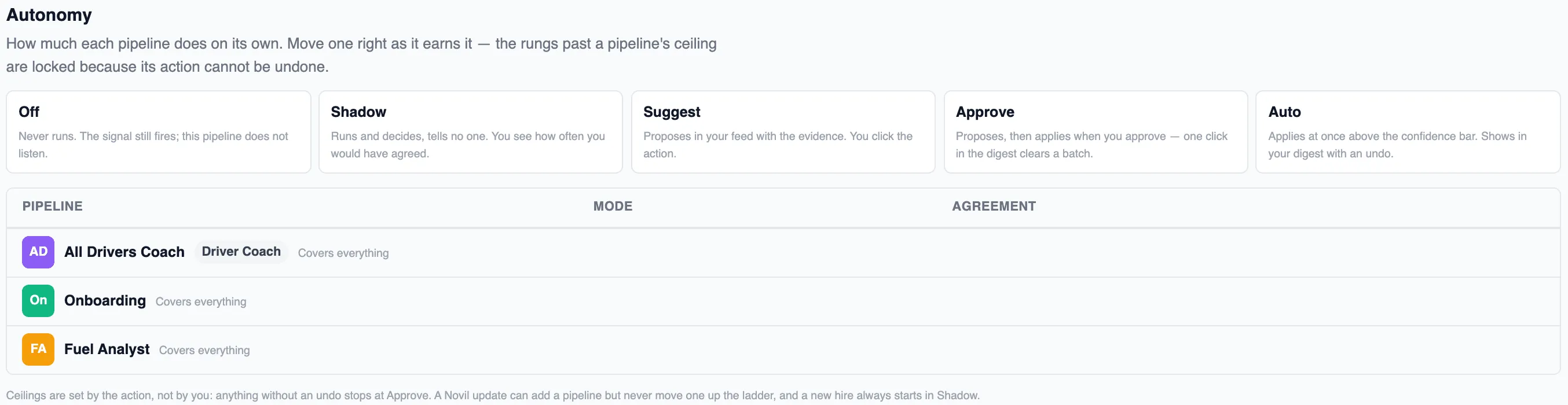
Autonomy settings listing the Off, Shadow, Suggest, Approve and Auto rungs with what each does, the three hires that use them, and the note that ceilings are set by the action and a new hire always starts in Shadow
Autonomy in the product: the five rungs, the three hires, and the footnote that ceilings come from the action, never from a product update.

Evidence first

Every suggestion shows its work before you act

Every suggestion shows a confidence %, the evidence it read (chips like “Driver behavior”, “Plan compliance”, “Coaching history”), a “Before you act” list of caveats, and, for coaching, the exact note the driver would read.

  • A confidence %How sure the hire is, against the bar you set for that task.
  • The evidence it readChips like “Driver behavior”, “Plan compliance”, “Coaching history”, each expanded into the numbers behind the call.
  • “Before you act”A list of caveats: what the evidence cannot prove, and what to check first.
  • The exact noteFor coaching, the note the driver would read, drafted for you to send, edit or hold.

Actions are typed product commands, never raw edits

Send a noteReassign a purchaseFix a mapping

Each one is the same command you would run yourself in the product, so it can be reviewed, approved in a batch, or undone.

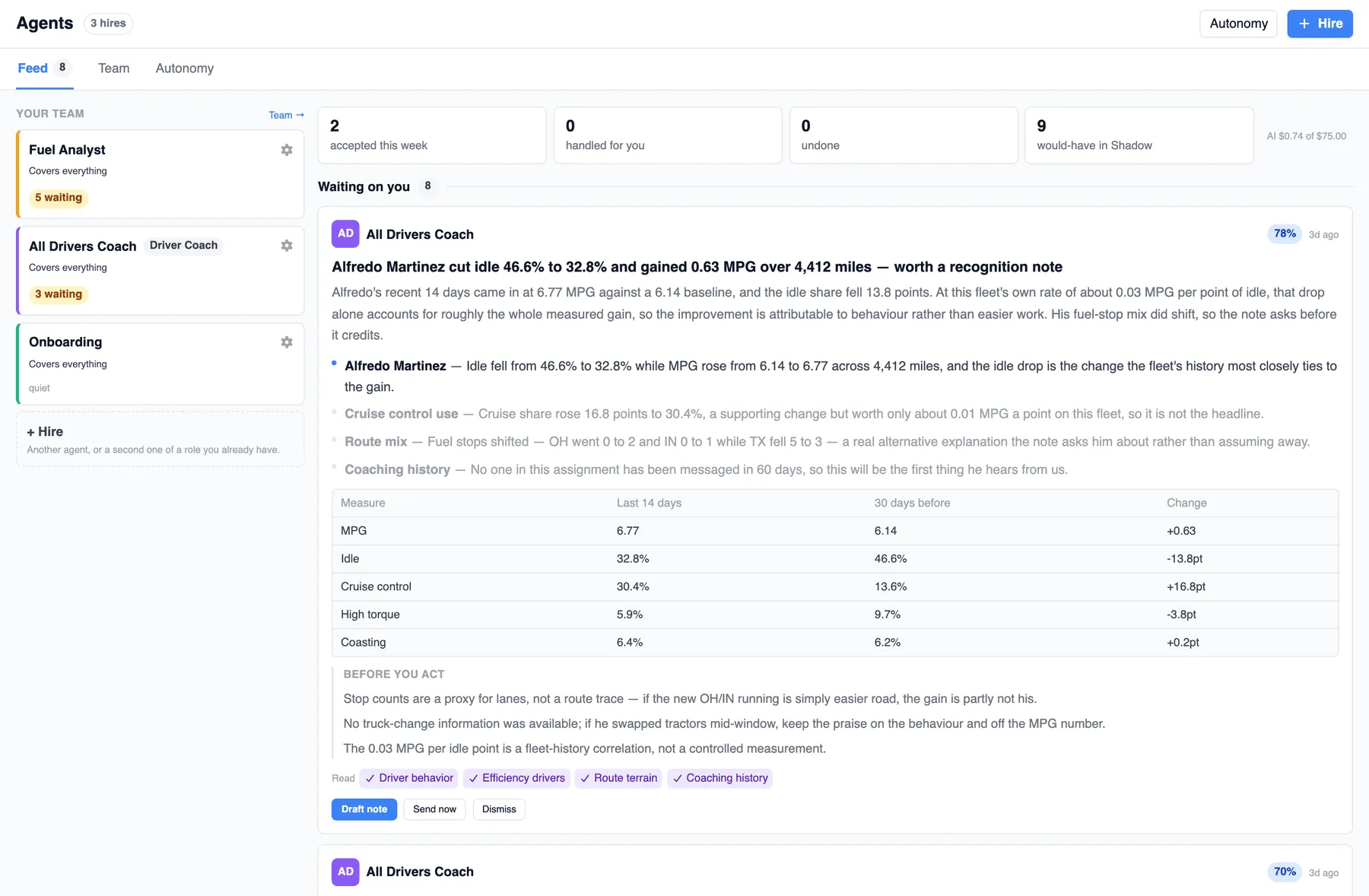
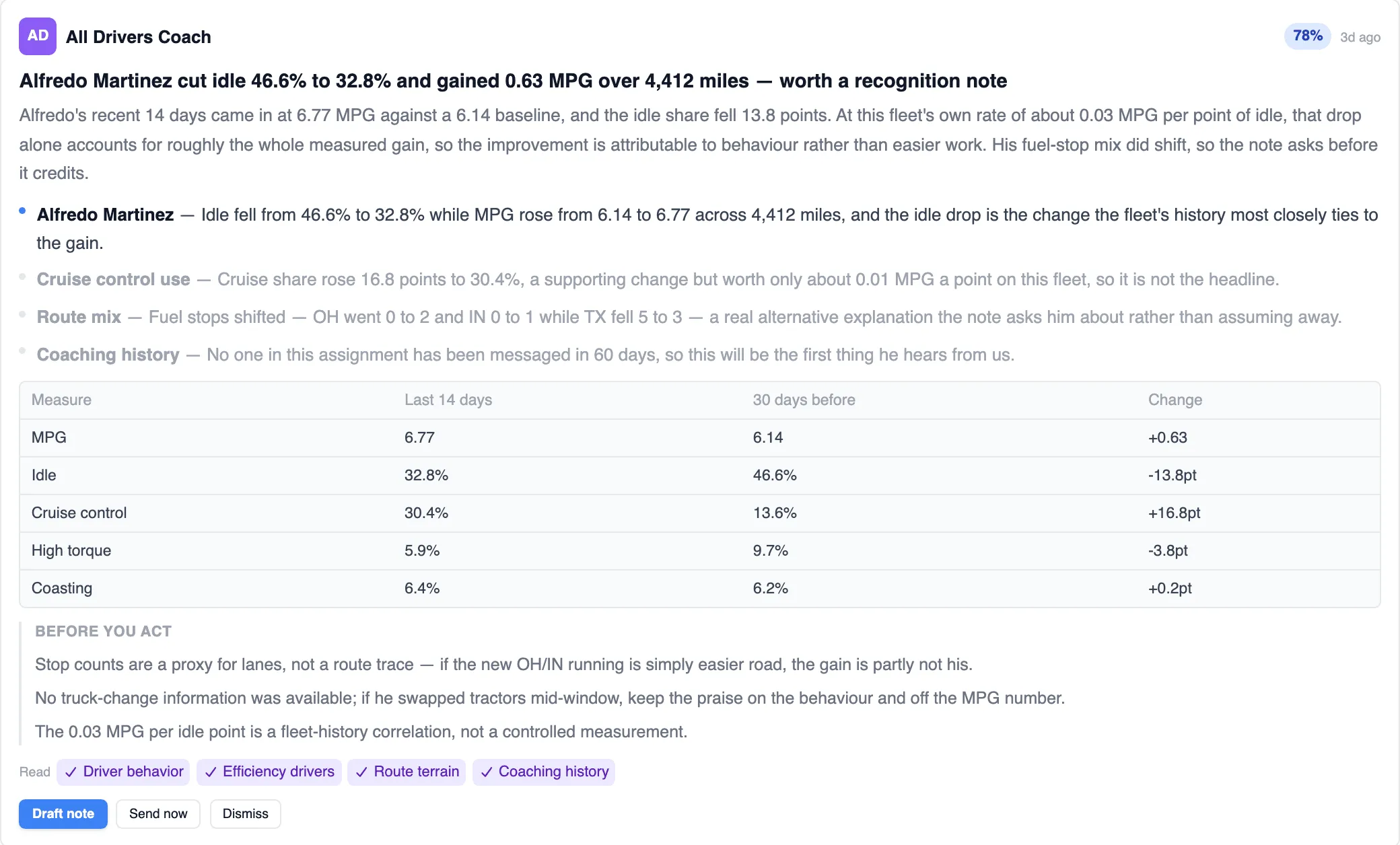
Driver Coach suggestion card at 78% confidence: Alfredo Martinez cut idle from 46.6% to 32.8% and gained 0.63 MPG, with evidence bullets, a 14-day versus 30-day metrics table, three Before you act caveats, evidence chips for driver behavior, efficiency drivers, route terrain and coaching history, and Draft note, Send now and Dismiss buttons
A real recognition suggestion: the evidence, the metrics behind it, the caveats, and one click to draft the note.
Fuel Analyst68% sureWaiting on you

169-gal, $606.23 Texarkana buy sits on a truck with no tank movement; only vehicle 222 was there and its tank rose 185 gal

  • The purchase is mapped to a truck that recorded no tank movement at all for this 168.91-gallon fill.
  • Vehicle 222 was the only vehicle telematics placed at the Flying J in Texarkana, and its tank rose 185 gallons.
  • Position and tank movement both point one way and there is no second candidate to weigh against it.
Before you act
  • The card driver was not assigned to either truck, so the usual card-mapping story is unconfirmed and this rests on the telematics and gauge evidence.
Tank movementVehicle pingsCard mapping
Driver Coach70% sureHeld

Alfredo Trevino hit 4 of 9 planned fuel stops but ran 111 miles under plan — draft asks why, not a correction

  • 4 of 9 planned stops hit over 14 Aug–10 Sep, with $12.59 paid above plan and 698 of 771 planned gallons bought.
  • Sep 2 stops: Saundersville, MS and Loudon, TN were both off plan on the same day, about 19¢/gal over.
  • He ran 111 miles fewer than plan across 4 routes, with total cost impact of -$57.55, so no detour penalty.
Before you act
  • One completed route could not be scored at all, so compliance may look worse or better than 4 of 9.
  • If dispatch confirms the plan stops were reachable within his hours, this becomes a coaching case rather than a planning fix.
  • Two of four off-plan stops are unpriced; the true price gap could be smaller or larger than 19¢/gal.
What the driver would read

Alfredo — a question, not a ding. On 2 Sep you fuelled at Saundersville, MS and Loudon, TN instead of the planned stops — 122 gallons at about 19¢/gal over the plan price that day. Across the last four weeks you hit 4 of 9 planned stops. What made the planned ones not work: hours, a dock hold, a site down, or the lane changing? Tell me which stops keep missing and I'll take it to planning.

Plan complianceOff plan stopsCoaching history

Readiness and budget

Runs only when the data is ready. Spends only what you budget.

A hire that cannot see the data stays quiet, and every one of them reports what it read, what it proposed and what it cost.

Readiness gates

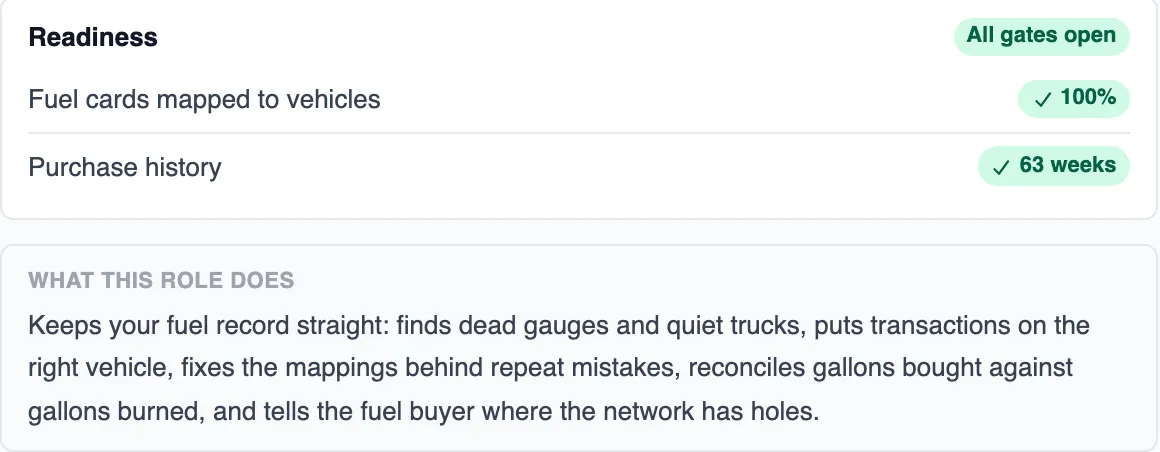
Readiness gates: a task only runs when its data is ready (e.g. fuel cards mapped to vehicles, weeks of purchase history). Until every gate is open, the task waits, and the hire page tells you which gate is closed.

Readiness panel for the Fuel Analyst with all gates open: fuel cards mapped to vehicles at 100% and 63 weeks of purchase history, above the What this role does description

An AI budget per hire

Each hire shows signals seen / proposed / accepted / agreement % and an AI cost against a monthly budget (e.g. “$0.74 of $75.00”), so you can see what a hire reads, how often you agree with it, and what it costs to run.

One hire · last 30 days

  • 258signals seen
  • 7proposed
  • 2accepted this week
  • 9would-have in Shadow
AI cost this month$0.74 of $75.00

Agreement % sits beside these: how often you accept what the hire proposes.

Next step

See an agent work your own fuel data

Walk through your fleet data and identify where cost, loss, and efficiency can improve. Use our Calendly scheduler to pick a time that works for you.